
Every Apple device comes with built-in iCloud storage. This iCloud storage helps you to your photos, documents, and other important documents and files. Your Apple account comes with 5 GB of iCloud storage. If you want to store more photos or videos, you will have to buy more storage. So, to solve the problem of inadequate storage space in the long run, you should buy more storage space on your iPhone. So, in this post, we will let you know how to buy more storage on iPhone.
Table of Contents
Steps to Buy More Storage on iPhone
Image Credit: geekstechs.org
Many people go through the frustrating issue of running out of space on their iPhones. But we cannot directly buy more storage space on iPhones. As against it, we can use various ways to increase iCloud storage space. Let’s take into account the following options to know about How to Buy More Storage on iPhone.
1) Buy iCloud Storage
One of the most convenient options to buy more storage on an iPhone is to grab the Buy iCloud store. Ensure to use the following steps to buy iCloud storage.
1) Open the settings app on your iPhone.
2) Go to your screen and then tap on your name. Once you perform this step, you will be able to access your Apple ID settings.
3) Now you will see the iCloud option. Tap on this option to proceed further.
4) In this step, scroll down the iCloud storage section. Then tap to manage storage.
5) Tap on Buy More Storage to see the different available plans and prices.
6) Out of these options price, select the storage plan that corresponds to your budget and price effectively.
7) Now, you will see the option of buy, you can simply click on that option to buy extra iCloud storage. For payment, you will have to select the payment option to use your Apple ID, and payment method.
8) As soon as you complete your purchase, your iPhone will start using the additional iCloud storage capacity.
Pros of Buying iCloud Storage
Accessing the option of buying iCloud storage comes with many pros. Some of these pros are as follows.
1) The iCloud storage option is extremely convenient and easy to use. The files can easily backed up to iCloud.
2) Whenever we use iCloud storage, it helps us to get rid of additional hardware or cables.
3) It is the most cost-effective option for individuals and families who need access to storage space on their devices.
4) Buying iCloud storage helps us access different iCloud features. For example, you can easily access, iCloud Drive, iCloud Photo Library, and more.
Cons of Buying iCloud Storage
If you buy more storage space on iCloud, it can have several disadvantages.
1) To access the facility of iCloud storage, we need to pay an online subscription fee. This fee amount makes it an expensive option.
2) You require a stable fast internet connection to upload and download internet files.
How to Get More Storage on iPhone without Buying Them
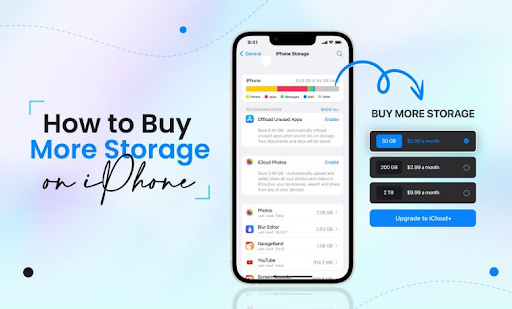
Image Credit: Cellular News
Well, you have seen the option of how to buy more storage on the iPhone. You can also use the option of accessing more storage on your iPhone without buying it. We are listing different options on how to buy iPhone storage.
1) If your iCloud space is decreasing, you need not always have to pay to buy extra storage space by paying for it. You can choose several options that help you in achieving your goal.
2) To get rid of unnecessary space, you can visit the photo section on your iCloud device and delete unwanted photos.
3) The next method of increasing storage space on the iPhone is to remove old backups of files. If you also have any old backup files on your iCloud device, consider deleting them fast. It will empty more space.
4) To make more space on your iCloud device, you can delete iCloud email attachments.
5) To empty enough storage space, you can clean the iCloud drive. This will help you to get more storage space on your iPhone.
With these options, you can learn how to buy more storage on iPhone, and apart from this, you can also use these above-mentioned tips to get enough space without paying for it. Can you want to want to aware about Unblocked Games WTF ?
Use Third-Party Cloud Service to Get More Storage
Image Credit: iTexchangeweb.com
Apart from exercising the options of how to buy more storage on iPhone, you can also use third-party cloud services to get more storage facilities on your iPhone. Using third-party cloud services is a great option as it helps us to enjoy different virtues of convenience, scalability, and security. These options help us to achieve the goal of getting more storage space on your iCloud account.
Conclusion
So, with these options, you can grab enough iCloud storage space. We hope now you are clear about how to buy more storage on iPhone. If any moment, you find that you have insufficient space in your iPhone for saving photos or watching movies, you can either buy iCloud storage, or empty the additional space by using these techniques. Use this technology of increasing iCloud storage and you will get the positive results on a swift note.

)